 Peebee Software Solutions
If you've used Zapier or Make (formerly Integromat) you know how handy workflow automation is — connect your apps, trigger actions automatically, and stop doing repetitive stuff by hand. The problem is those services are cloud-hosted, they get expensive fast, and your data flows through someone else's servers. n8n is the self-hosted alternative that fixes all of that.
What Is n8n?
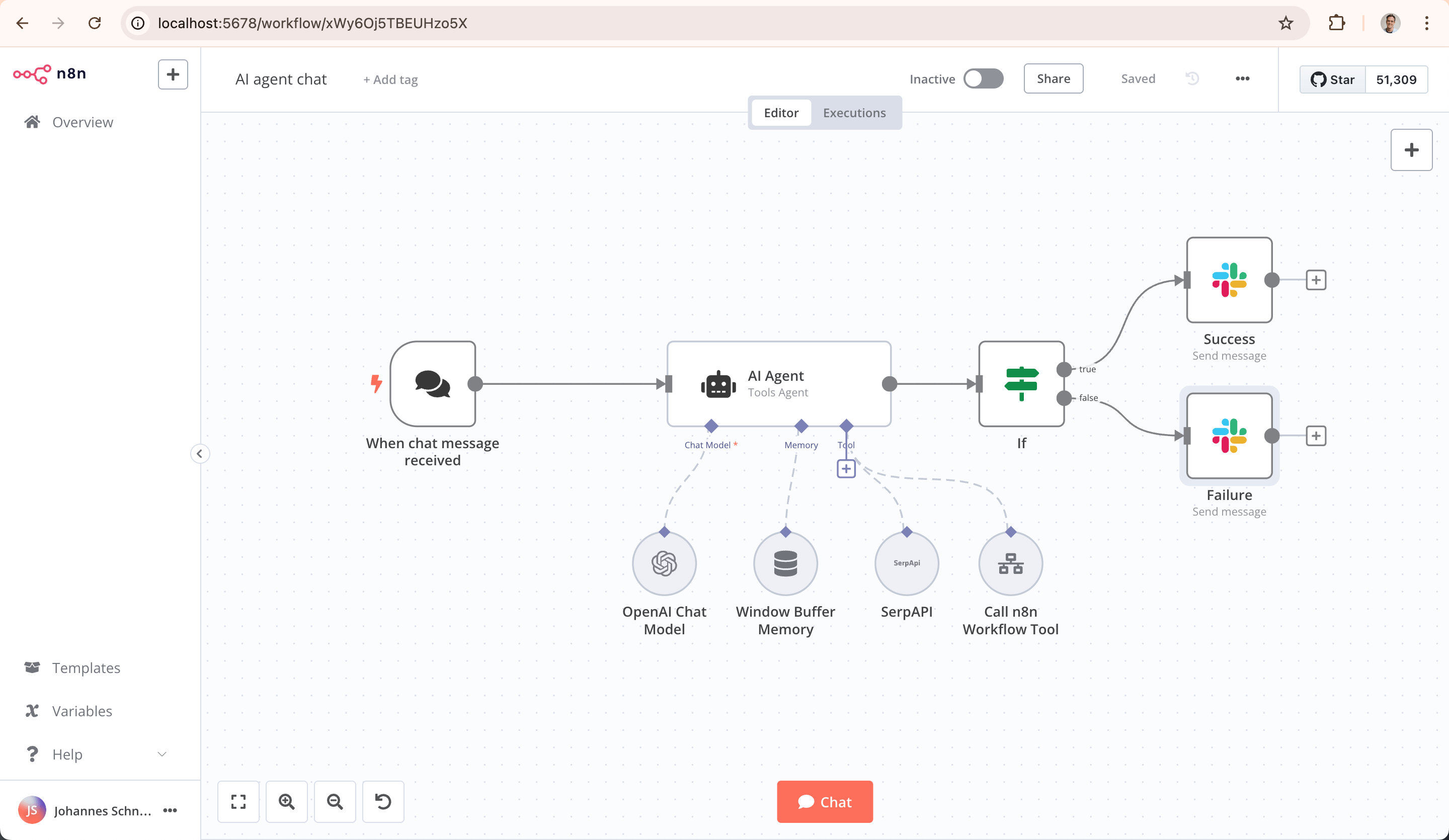
n8n (pronounced "nodemation") is a fair-code, self-hosted workflow automation platform. It gives you a visual drag-and-drop editor to build automations, with 400+ integrations out of the box. Connect your email, databases, APIs, chat platforms, cloud storage — pretty much anything — and wire them together without writing full applications.
What makes it stand out:
- 400+ built-in integrations (Slack, Gmail, GitHub, Postgres, HTTP, and heaps more)
- Visual workflow editor — drag, drop, connect
- Write JavaScript or Python when you need custom logic
- AI-native — build LLM agent workflows with LangChain integration
- Self-hosted — your data stays on your hardware
- REST API and webhook triggers for external integrations
- 900+ community-shared workflow templates
Quick Start with Docker
The fastest way to try n8n is a single Docker command:
docker volume create n8n_data

docker run -it --rm \
  --name n8n \
  -p 5678:5678 \
  -v n8n_data:/home/node/.n8n \
  docker.n8n.io/n8nio/n8n
Open http://localhost:5678 and you're in. But for anything beyond a quick test, you'll want Docker Compose.
Production Setup with Docker Compose
For a proper setup with PostgreSQL (recommended over SQLite for reliability), create a project directory:
mkdir -p ~/n8n && cd ~/n8nCreate a .env file with your configuration:
# .env
POSTGRES_DB=n8n
POSTGRES_USER=n8n
POSTGRES_PASSWORD=change-me-to-something-secure
POSTGRES_NON_ROOT_USER=n8n
POSTGRES_NON_ROOT_PASSWORD=change-me-to-something-secure

# n8n config
N8N_HOST=localhost
N8N_PORT=5678
N8N_PROTOCOL=http
WEBHOOK_URL=http://localhost:5678/
GENERIC_TIMEZONE=Australia/Sydney
NODE_ENV=production
Create your docker-compose.yml:
services:
  n8n:
    image: docker.n8n.io/n8nio/n8n:latest
    container_name: n8n
    restart: unless-stopped
    ports:
      - "5678:5678"
    env_file:
      - .env
    environment:
      - DB_TYPE=postgresdb
      - DB_POSTGRESDB_HOST=postgres
      - DB_POSTGRESDB_PORT=5432
      - DB_POSTGRESDB_DATABASE=${POSTGRES_DB}
      - DB_POSTGRESDB_USER=${POSTGRES_NON_ROOT_USER}
      - DB_POSTGRESDB_PASSWORD=${POSTGRES_NON_ROOT_PASSWORD}
    volumes:
      - ./data:/home/node/.n8n
      - ./files:/files
    depends_on:
      postgres:
        condition: service_healthy

  postgres:
    image: postgres:16-alpine
    container_name: n8n_postgres
    restart: unless-stopped
    env_file:
      - .env
    environment:
      - POSTGRES_DB=${POSTGRES_DB}
      - POSTGRES_USER=${POSTGRES_USER}
      - POSTGRES_PASSWORD=${POSTGRES_PASSWORD}
    volumes:
      - ./postgres-data:/var/lib/postgresql/data
    healthcheck:
      test: ["CMD-SHELL", "pg_isready -U ${POSTGRES_USER} -d ${POSTGRES_DB}"]
      interval: 5s
      timeout: 5s
      retries: 10
Fire it up:
docker compose up -dOpen http://your-server-ip:5678 and create your admin account on first launch.
What the Volumes Do
/home/node/.n8n— n8n config, encryption keys, and credentials storage/files— Shared file storage accessible from workflows (read/write files in automations)/var/lib/postgresql/data— PostgreSQL database files
/home/node/.n8n volume contains your encryption key. If you lose this, you lose access to all saved credentials. Back it up.
Environment Variables Explained
N8N_HOST— Hostname n8n listens onN8N_PROTOCOL—httporhttpsWEBHOOK_URL— External URL for webhook triggers (important if behind a proxy)GENERIC_TIMEZONE— Timezone for cron/scheduled workflowsDB_TYPE—postgresdbfor PostgreSQL, or omit for SQLiteNODE_ENV— Set toproductionfor stability
SQLite vs PostgreSQL
n8n defaults to SQLite, which is fine for personal use and testing. But if you're running workflows that execute frequently or handle lots of data, PostgreSQL is the way to go:
- SQLite — Zero config, single file, great for getting started
- PostgreSQL — Better concurrency, more reliable under load, proper backups
If you want to keep it simple with SQLite, just drop the postgres service and the DB environment variables. The compose file becomes much shorter:
services:
  n8n:
    image: docker.n8n.io/n8nio/n8n:latest
    container_name: n8n
    restart: unless-stopped
    ports:
      - "5678:5678"
    environment:
      - GENERIC_TIMEZONE=Australia/Sydney
      - N8N_PROTOCOL=http
      - NODE_ENV=production
    volumes:
      - ./data:/home/node/.n8n
      - ./files:/files
Putting It Behind a Reverse Proxy
If you're running nginx, here's a location block to proxy n8n. Note the WebSocket support — n8n's editor needs it:
location /n8n/ {
    proxy_pass http://127.0.0.1:5678/;
    proxy_set_header Host $host;
    proxy_set_header X-Real-IP $remote_addr;
    proxy_set_header X-Forwarded-For $proxy_add_x_forwarded_for;
    proxy_set_header X-Forwarded-Proto $scheme;

    # WebSocket support (required for the editor)
    proxy_http_version 1.1;
    proxy_set_header Upgrade $http_upgrade;
    proxy_set_header Connection "upgrade";

    client_max_body_size 50M;
}WEBHOOK_URL in your .env to match the external URL (e.g. https://yourdomain.com/n8n/) or your webhook triggers won't work.
What Can You Automate?
A few ideas to get you started:
- Monitor a GitHub repo and post new issues to Slack/Discord
- Scrape a webpage on a schedule and email you when it changes
- Auto-backup a database and upload to S3/Backblaze
- Process incoming emails and file attachments automatically
- Build an AI chatbot workflow with OpenAI/Ollama
- Sync data between two databases or APIs on a cron
Worth It?
If you've ever paid for Zapier or spent hours writing scripts to glue services together, n8n is a no-brainer. The visual editor makes simple automations dead easy, and when you need more power you can drop into code. Runs great on a homelab box and the community templates mean you rarely start from scratch.
Links: